Postfix yandex relay
Как сконфигурировать postfix, чтобы он отправлял почту через stmp-сервер Яндекса
Я тут перевез свой блог в Облако Яндекса и по пути столкнулся с трудностью - не отправляются письма. В логах моего любимого почтовика постфикса ошибка:
Jun 17 00:32:56 vm1 postfix/smtp[1374175]: connect to gmail-smtp-in.l.google.com[142.251.1.26]:25: Connection timed out
Jun 17 00:32:56 vm1 postfix/smtp[1374175]: connect to gmail-smtp-in.l.google.com[2a00:1450:4010:c0d::1a]:25: Network is unreachable
Jun 17 00:33:26 vm1 postfix/smtp[1374175]: connect to alt1.gmail-smtp-in.l.google.com[142.250.157.27]:25: Connection timed out
Jun 17 00:33:26 vm1 postfix/smtp[1374175]: connect to alt1.gmail-smtp-in.l.google.com[2404:6800:4008:c13::1a]:25: Network is unreachable
Jun 17 00:33:56 vm1 postfix/smtp[1374175]: connect to alt2.gmail-smtp-in.l.google.com[173.194.202.26]:25: Connection timed out
Обратился в поддержку. Оказалось, что из облака исходящий трафик на 25 порт заблокирован. Отправлять почту можно только через сервера яндекса от имени какого-то пользователя.
Поскольку мой домен - codepoetry.ru
То пользователь пусть будет root@codepoetry.ru
Домен уже делегирован на яндекс, поэтому я просто добавил нового пользователя и залогинился под ним в почту, чтобы поставить галочку "Я согласен ..."
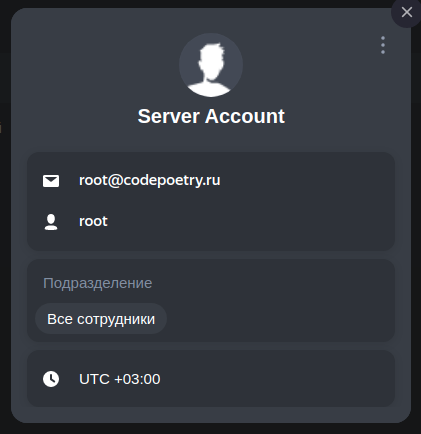
Потом от этого пользователя зашел в настройки профиля и создал отдельный пароль:
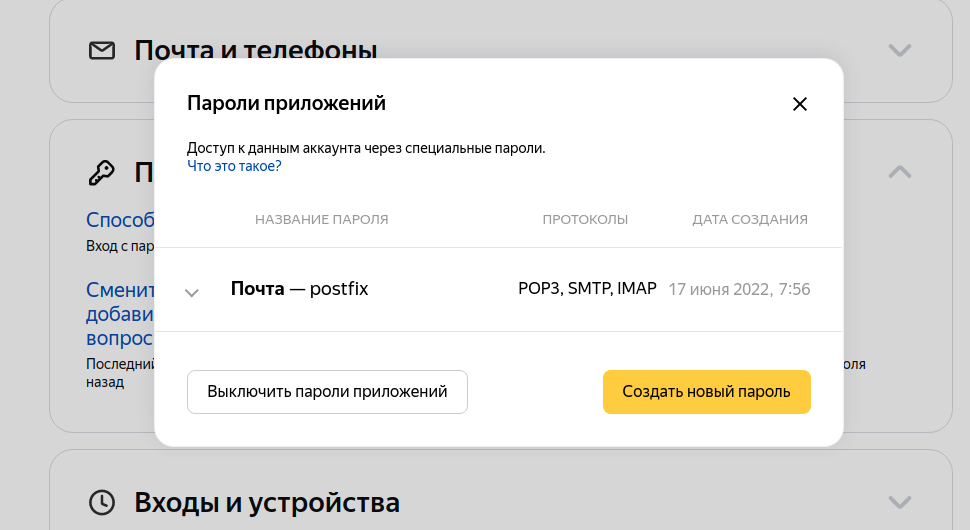
Если у вас нет своего домена, то можете просто создать новый ящик вида myserverroot@yandex.ru - в остальном настройка ничем не отличается.Дальше можно перейти к настройке, собственно, postfix.
Postfix relay
Дописываем в основной конфиг /etc/postfix/main.cf следующие строки:
smtp_sasl_auth_enable = yes
smtp_tls_security_level = encrypt
smtp_tls_wrappermode = yes
smtp_sasl_security_options = noanonymous

smtp_sasl_password_maps = hash:/etc/postfix/sasl_passwd

relayhost = [smtp.yandex.ru]:465
Создаем файл с логином-паролем:
sudo touch /etc/postfix/sasl_passwd
sudo chmod 0640 /etc/postfix/sasl_passwd
И пишем туда:
[smtp.yandex.ru]:465 root@codepoetry.ru:my-passwordТут важно отметить, что строка [smtp.yandex.ru]:465 должна быть одинаковой и там и там.
Потом не забудьте превратить файл в базу данных:
sudo postmap /etc/postfix/sasl_passwdИ сделаем релоад, чтобы постфикс подхватил изменения конфига
sudo systemctl reload postfixПроверка
Дальше я открыл в одном окне логи
sudo tail -f /var/log/mail.logА из другого отправлял письма
echo "This is the body of the email" | mail -s "This is the subject line" dima@gmail.comПисьмо не ушло, а в логе появилась ошибка 553 5.7.1 Sender address rejected: not owned by auth user. 1655646734-7knhhkCpkb-qEMS4B3Z (in reply to MAIL FROM command))
В статьях яндекса об этом говорится. По логу выше видно, что в поле FROM стоит адрес from= - а должно быть dima@vm1.ru-central1.internalroot@codepoetry.ru, иначе яндекс не примет.
Поэтому я добавил в main.cf:
smtp_generic_maps = hash:/etc/postfix/genericИ создал файл /etc/postfix/generic:
@vm1.ru-central1.internal root@codepoetry.ruТеперь для любых отправленных с сервера писем в момент их выхода будет подменяться адрес отправителя. Не забудем переиндексировать:
sudo postmap /etc/postfix/generic
sudo systemctl reload postfix
Другие возможные ошибки
503 5.5.4 Error: send AUTH command first. 1655644978-vxV6fiLXFy-MwN8PqpG (in reply to MAIL FROM command))Вы забыли включить smtp_sasl_auth_enable = yes
SMTPS wrappermode (TCP port 465) requires setting "smtp_tls_wrappermode = yes", and "smtp_tls_security_level = encrypt" (or stronger)status=deferred (delivery temporarily suspended: SASL authentication failed; cannot authenticate to server smtp.yandex.ru[77.88.21.158]: no mechanism available)status=deferred (SASL authentication failed; server smtp.yandex.ru[77.88.21.158] said: 535 5.7.8 Error: authentication failed: This user does not have access rights to this service 1655646115-7Ko3u9UTap-ftNKo6bN)Вот эта ошибка интересная и сначала поставила меня в тупик. Чтобы победить, нужно разрешить доступ почтовых программ в настройках почты:
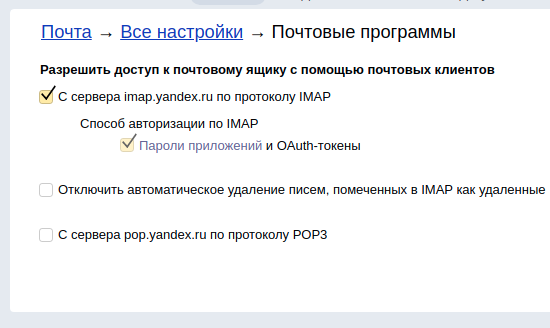
Не очевидно, что imap влияет на возможность функционирования smtp.
When planning a cosplay look, it is worth considering how details related to fabric and comfort will affect the complete look. As fans study the source material, reviewing details related to character costumes also makes comfort and movement easier to judge. For combinations connected with details related to fabric and comfort, character costumes for anime fans can help narrow the options for a specific purpose. When planning for care after the photoshoot, a balanced view of details related to cosplay accessories can support both detail and comfort.